
Ever wanted to make a photocard of your favorite pro player? This tutorial covers everything that you need, including instructions, materials, templates, and free-to-use designs.
DISCLAIMER
Please do not print photocards to sell and be cautious about using photos that you do not have the rights to. This tutorial is for entertainment purposes and might not work for everyone.
Table of Contents
- Table of Contents
- Making photocards at home
- Making photocards using a printing service
- Specifications
- Templates
- Backing Designs
Making photocards at home
Making photocards is not as difficult as you might think. This option is best suited for those who only want to make a few photocards for themselves.
You will need:
- Heavyweight paper (min. 200 gsm). I recommend 8.5 x 11 inches or A4 size
- Printer (I use the Epson Ecotank as a budget option)
- Paper cutting tool (You can use scissors or a craft knife and ruler but I recommend using a paper cutter)
- Self-adhering laminate sheets (I prefer matte for the authentic photocard look but glossy tends to be cheaper and easier to find. Good brands are Avery (cheaper) and Oraguard)
- Corner rounder (Technically optional but it is very difficult to round them manually if that’s the look you prefer)
- Photographs (HD photographs preferred)
- Backing design (Free backing designs can be found at the bottom of the page)
- Design software (You can use Canva, Photoshop, Illustrator, Photopea)
Pros and Cons to making photocards at home:
Pros
Making photocards at home can be cheaper if you already have a printer, especially when it comes to printing multiple designs. You have much more control over the outcome and you can print as little or as many as you want.
Cons
Incredibly time-consuming, difficult to print double sided without a double sided printer, easy to make mistakes, uses up a lot of ink depending on the printer you have, and most home printers can’t handle 300+ gsm paper so your photocards will be thinner than standard photocards.
TIP: Some libraries have cutting machines or tools you can use such as a Cricut. Some schools also have creative labs for students. These machines can help save a lot of time!
Basic instructions:
- Open up your template in your editing software of choice
- Add your photos in, making sure to centre each one and crop them to best fit the template
- Print (Make sure your printer settings match the paper size and type)
- Following the directions on the laminating sheets you purchased, apply the laminate to your photos carefully. Use a squeegee or thick plastic card to apply and remove any air bubbles
- Cut out your photocards with cutting tool of choice and then optionally use your corner rounder tool to give it that authentic photocard look
Need a video tutorial? Check out these ones below:
How to make photocards at home by Gyuppiifish (ENG)
Let’s Try Making PHOTOCARDS at Home! by Rinspirit_art (ENG)
Make High Quality Kpop Photo Cards With meee by Harlene (ENG)
How to make photocards + mini easel – DIY K-pop/anime by blossomafer (ESP)
Making photocards using a printing service
Hosting an event? Visiting a live game? Or perhaps you’re following this tutorial but using your own fan art. Regardless, whether you need a large quantity or simply just don’t have the supplies, a printing service might be a better option for you.
You will need:
- Photographs
- Backing designs (Free designs below)
- Specifications and/or template (usually a printing business would provide the template for you)
- Printing service (Suggestions below)
Pros and Cons to making photocards using a printing service:
Pros
Making photocards using a printing service is much less work, and often produces higher quality results as printing services usually have better paper, industrial printers, paper cutting machines, etc.
Cons
Can be expensive, some places have a minimum order quantity (MOQ) meaning you need to order a certain amount, you have less control over the end product, customization tends to increase the prices
Specifications
Size: 85 x 55 mm / 3.35 inches x 2.17 inches
Weight: 16pt (min.), 300 gsm (min.)
Finish: Matte or Glossy (your preference, but standard for photocards is a matte finish)
Printing: Single-sided if you don’t have a backing design, double-sided if you do have a backing design
Online Printing Services
If you don’t have a local printer that you can go to, you can try some of these options. Please note that you’ll likely have less control over certain things (like sizing). These are ordered by least to most recommended.
- VistaPrint: Classic large printing service, relatively high MOQs, limited in sizing as you’d print it in business card size which is not the same as photocard size and not very customizable, however pretty accessible.
- MOO: Allows you to customize each design and backing, but you’re limited to their sizing (standard business card design or MOO size which is similar but not exact to photocard size). Also extremely expensive
- Vograce: Lower MOQ and very cheap but some people have had poor quality experience. Also it’s printed and shipped from overseas so you might get hit with customs. I personally have used Vograce and had nothing but positive experiences with them. They also offer many different printing techniques like holographic or foiling methods. (Please note Vograce is best for fan art rather than photos)
- PicsQueen: I have never personally used this site, but it is used for printing custom K-Pop photocards. They have high quality products but their prices are very high. You have full customization options but limited printing techniques. Would recommend for low quantities
- AliBaba: Reputable printing services with many different customization options and printing techniques. However, you need to do a lot of research to find one with low MOQs. Again, printed and shipped overseas so possible customs, but highly recommended if printing larger quantities
Templates
Don’t want to spend a lot of time figuring out the measurements to manually make a photocard template? No worries, I got you!
- PrintableMaker.com – easy to use, can adjust to any size paper
- Canva Template made by 17caratshop – A4 size
- Photoshop Template (on the way!)
- Illustrator Template (on the way!)
Backing Designs
Backing designs can be as simple or as complicated as you want them to be. Use a plain background or the logo of your team, or you can create your own using Canva, Photoshop, or any other of your favourite design software.
TIP: Be sure to follow the template if given to you by your printing service of choice, but if you’re making backing designs on your own I recommend giving yourself a bleed of 2.5-5 mm that can be trimmed off or be sure to keep important design elements centred so they aren’t cut off when printing.
Don’t want to design your own? I’m currently working on a Google Drive full of backing designs just like the one below. I will update the Drive as much as possible with new designs.
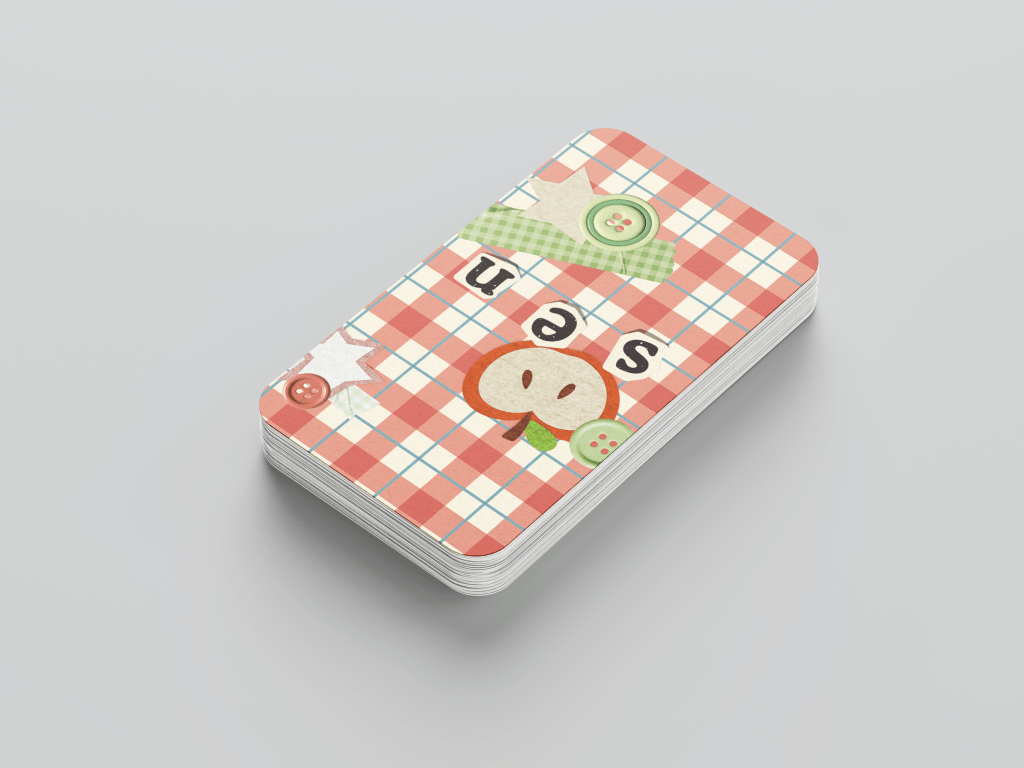
Wanna submit a design? Send me an email at tsuzerra@gmail.com with your design attached and the subject as “photocard backing design”.
Please be sure to add the team the design is for and your name/username for proper credit attribution.
If you have any questions please do not hesitate to contact me on Twitter @ tsuzerra or through email via tsuzerra@gmail.com
 the defuse
Leave a comment